
If you have a warehouse or large store with a lot of SKUs and you want to keep track of where these items are located, you can set up Bin Locations.
You can breakdown bin locations by:
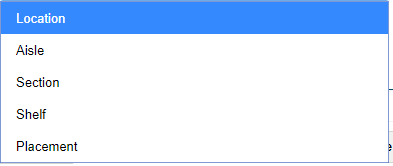
Location: If you have multiple warehouses or retail locations
(Warehouse A, Warehouse B, Vancouver Retail, London Retail, Dry Area, Cooler, Freezer, etc.)
Aisle: List Aisles by numbers, similar to that of Home Depot, Canadian Tire or Supermarket. These should be listed on the side of the aisle. Odd numbers can be placed on one side and evens on the other.
(1, 2, 3, 4, 5, etc.)
Section: If you break your aisles down into sections such as the location of the section in the aisle or label the section with an alphabetical tag.
(Frt = Front, Md = Middle, Bk = Back or A, B, C, D, etc.)
Shelf: The level at which you place the product or bin at. Start with the lowest level shelf being listed as 1 and move up from there.
(1, 2, 3, 4, etc.)
Placement: The placement location on the exact shelf.
(A, B, C, etc)
Alternating characters helps users quickly break down a bin location and helps with cost savings over time with employee time and soft costs of delivering the right products to your customers.
Printing the labels for bin locations should be done out of your label maker.
Example
A customer walks into Marry's Grocery Store and asks the customer service desk where she can find the 'Walkers Red Pepper Flakes'. Off the top of her head, Marry knows where they are but would like to let the customer know exactly where they are in the store.
In here Global Office Software system looks up the product in the inventory module and navigates to the statistics page where the bin location is kept. She clicks on the view button and sees that the 'Walkers Red Pepper Flakes' are located in Aisle 14, on the Right Hand Side, in the middle of the Aisle, on the Top Shelf.
Steps To Set Up a Bin Location
1. Choose 
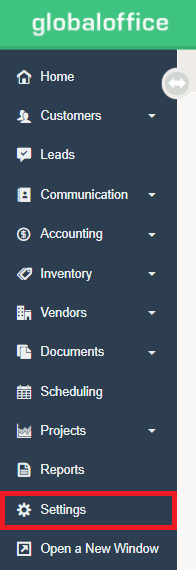
2. Under  choose Bin Locations

3. Select 

4. Complete the fields.
a) Type: Choose from Location, Aisle, Section, Shelf, or Placement
b) Type in the Value of the Bin Location. For example, if it's an Aisle, the value is the Aisle Number.
c) Type in the Description of the Bin Location
5. Choose 
Comments
0 comments
Article is closed for comments.