
Actions:
1. Go to Inventory.
2. Under the Transfer Heading, choose Transfers.
3. Click on the blue edit button to the left of the transfer you want to receive. Be sure that the status of the transfer is set to 'In Transit'.
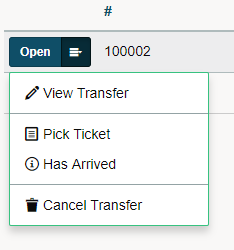
3. Click on 'Has Arrived'.
4. A new window populates with the details of the inventory transfer. Make sure that the Quantity Received is correct. Finish by clicking on Save & Complete Transfer.
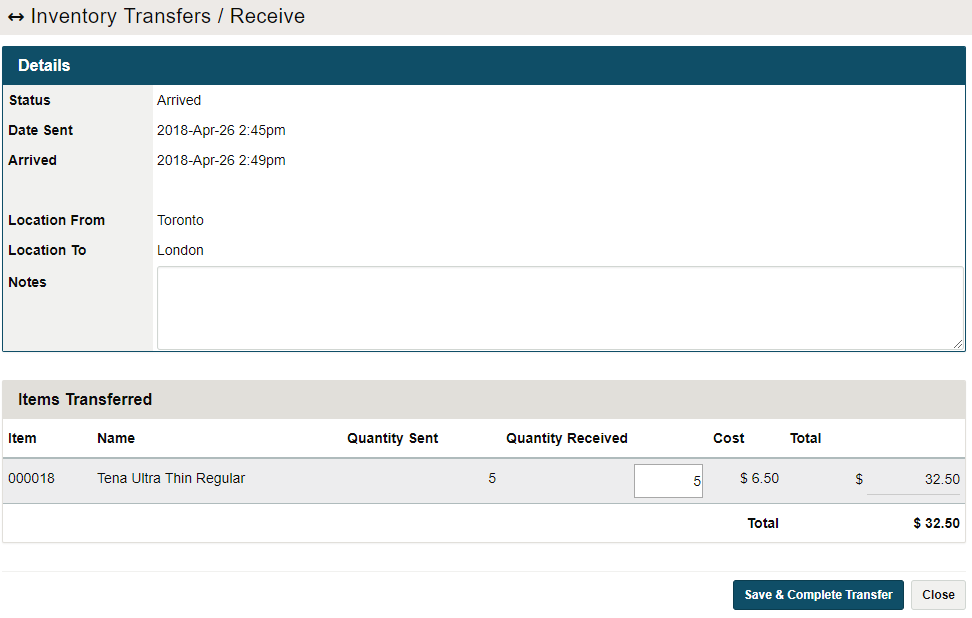
If the quantity received is lower than the quantity sent, the difference will be automatically returned to the sending location, and you will need to notify them of the discrepancy. This can happen if the wrong quantity is sent or the items are damaged in transit.
Comments
0 comments
Please sign in to leave a comment.