
Before projects can be used, the project module must be turned on and the user must have access to the areas of projects through their selected User Type.
Steps:
Click on the Project Module.

Click on the [+ New Project] button in the top right-hand corner.

A new screen will appear.
Fill out the Project Details
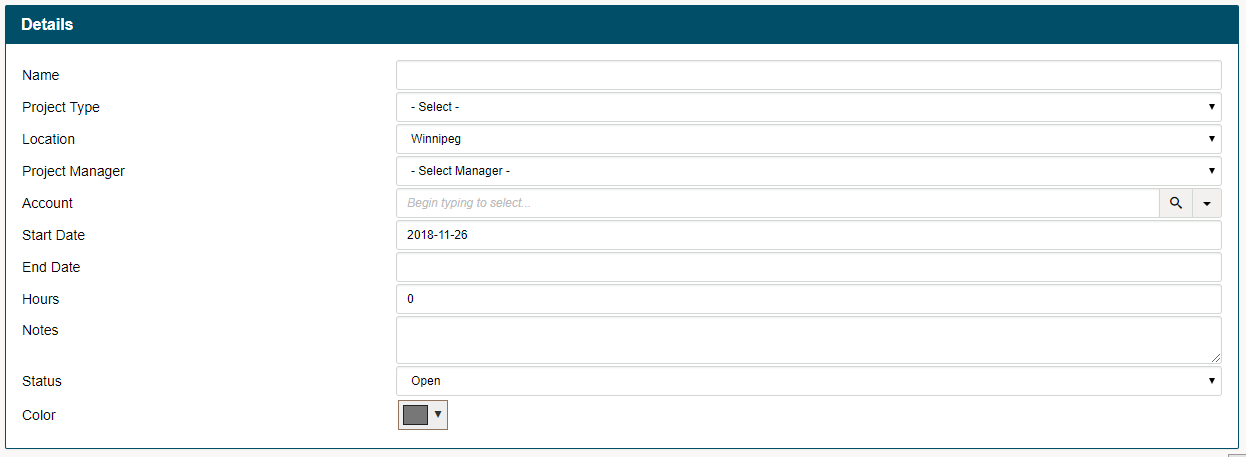
- Name - Name of the project
- Project Type - select the project type from the drop-down. Project types are set up in system settings
- Location - Select the company location that will be completing the project
- Project Manager - Select one of your employees from the drop-down menu
- Account - what customer will be tied to the project
- Start Date
- End Date
- Hours - Estimate the overall hours needed to complete the project. Be sure if you have multiple employees onsite that you calculate the hours (x # of employees)
- Notes - basic notes on what will occur in the project
- Status - Of the overall project
Learn how to set up the project employees
Learn how to fill out the Project Schedule
Learn how to fill out the Project Products & Services
Learn how to fill out the Project Expenses
See Project History
Comments
0 comments
Please sign in to leave a comment.