
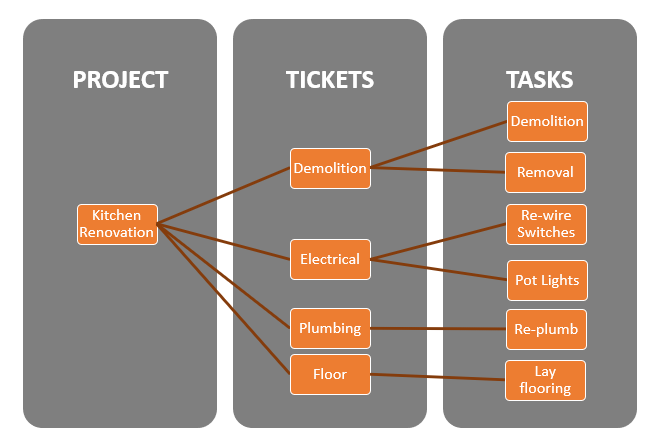
Using the Projects module is a great way to break large projects down into smaller tickets that assigned to employees.
Think of all the tasks (tickets) that are needed to be assigned to employees for a construction crew to build a house. Here are some examples of (tickets):
| Grading and Site Prep | Foundation pouring |
Framing |
| Windows and Doors | Roofing | Siding |
| Rough Electrical | Rough Plumbing | HVAC |
| Insulation | Drywall | Underalyment |
| Trim | Painting | Finish Electrical |
| Kitchen Installation | Finish Plumbing | Flooring |
| Finish HVAC | Water & Well | Sewer & Septic |
| Landscaping | Driveway | Fencing |
Many of these steps are performed by different employees and overseen by a contractor or project manager.
To set up projects, you must first set up the (3) following project settings. Click on the links to find out more about how the project settings should be set up best for your organization.
Project Types:
Segment all of your projects down into the repeatable projects that occur with customers.
Examples:
- Sales
- Service
- Customer Service
- Lift Installation
- Bathroom Remodel
Ticket Categories:
Breakdown projects into tickets. Tickets are processes within the project that can further be broken down into tasks.
Examples:
Sales
- Trials
- Quote
- Sales Order
- Invoice
- Purchase Order
- Rental
- Contract
In-house Service
- Repair
- Inventory
- New Build
Onsite Service
- Work Order
- Site Preparation
- Demolition
- Installation
- Configuration
- Clean-Up
Miscellaneous
- Miscellaneous
Ticket Statuses:
All tickets need to have an assigned status to know where each project is. Keep track of the status of a project by setting up the different statuses from the start to finish and the order that they will come in.
Examples:
| Level | Name | Status |
| 1 | New | Open |
| 2 | Assigned | Assigned |
| 3 | WIP | WIP |
| 4 | Not Assigned | Not Assigned |
| 5 | Quality Assurance | Quality Assurance |
| 6 | Complete | Complete |
| 7 | Canceled | Canceled |
Comments
0 comments
Please sign in to leave a comment.