
In a Project, tickets represent a group of specific tasks.
It is helpful for any project manager to know the status of the project at any one time. You can create your own custom ticket statuses, as general or as specific as you like.
Example
For example, a ticket called Fix PC Board could have the general statutes of In Progress and Completed, or even more specific, such as In Progress - parts ordered.
- Open
- Assigned
- In Progress
- Future
- QA
- Closed
- Cancelled
Steps
Go to the System Settings., under the Projects & Tickets Heading, choose Ticket Statuses.
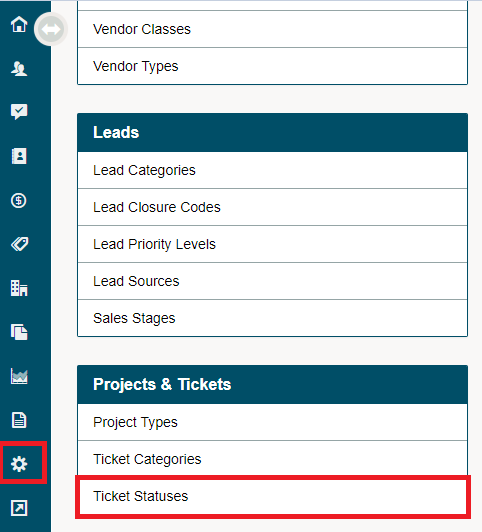
Choose New Status.

Complete the fields.
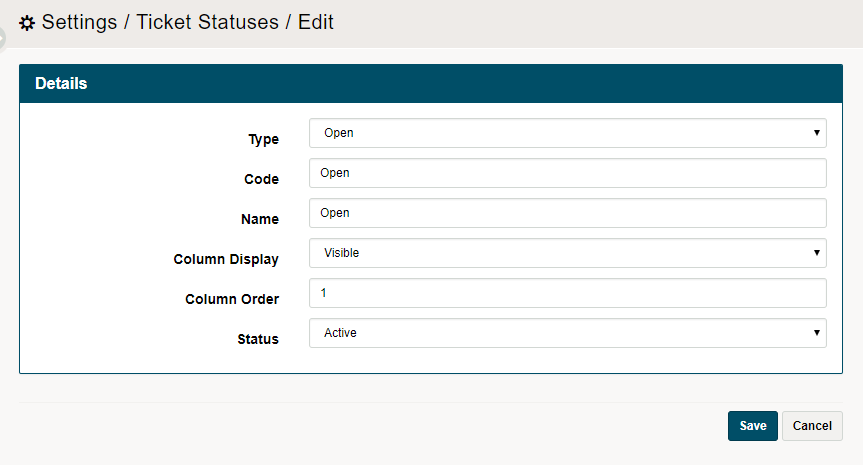
- Type: Open, Assigned, In Progress, Future, QA, Closed, Cancelled
- Code: Shortcode name of the name of the ticket status
- Name: Actual name of the ticket status
- Column Display: Visible, Hidden
- Column Order: The higher the number, the lower it will appear in the list of ticket statuses
- Status: Active, Deleted
Comments
0 comments
Please sign in to leave a comment.