
SKU Attributes are a great way to quickly list one base product with a ratio of many products that can be added to the base product to enhance or alter the product.
The enhancements and alterations could possibly change the price of the product, and in fact, will become an entirely different product with different SKU number themselves.
Example
You have a scooter that comes in three colours (red, blue, and black) with two wheel sizes (10, 12) with the option of two seats (leather, cloth).
Your Global Office Software system has the ability to set up all the combinations of with the help of SKU Attributes.
| Red / 10 / Leather | Blue / 10 / Leather | Black / 10 / Leather |
| Red / 12 / Leather | Blue / 12 / Leather | Black /12 / Leather |
| Red / 10 / Cloth | Blue / 10 / Cloth | Black /10 / Cloth |
| Red / 12 / Cloth | Blue / 12 / Cloth | Black /12 / Cloth |
Steps
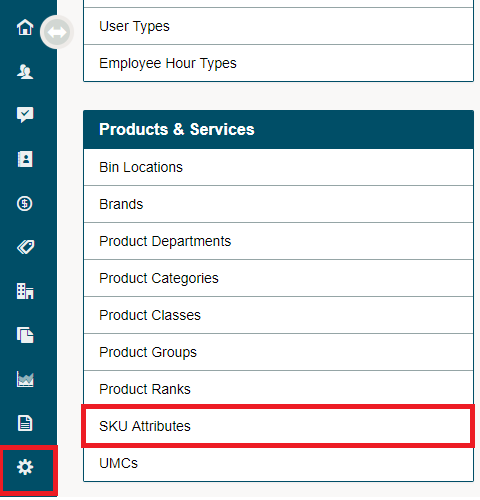
Go to Settings and Under Products and Services Heading, choose SKU Attributes.
Click [+ New SKU Attribute] located in the top right corner of the page.

SKU Attribute Details
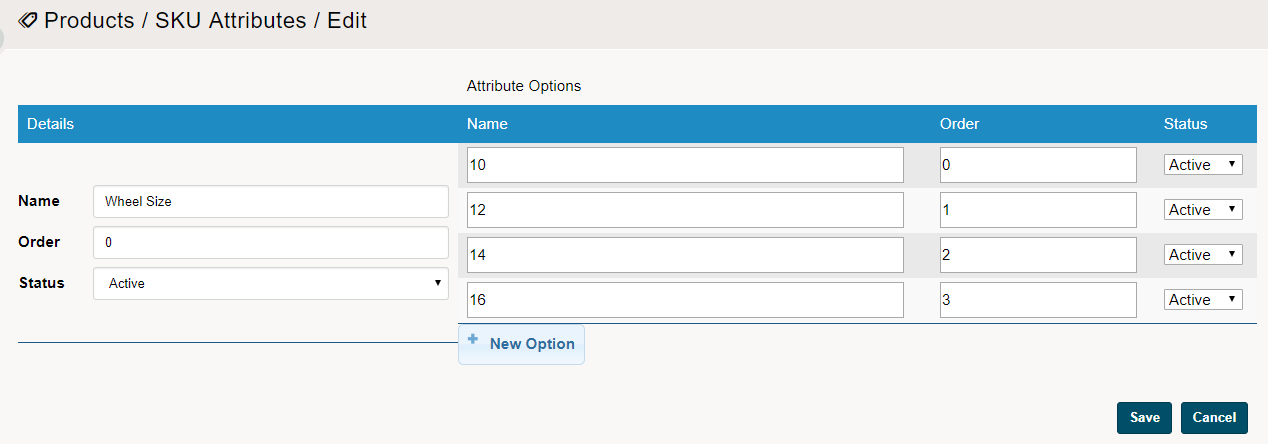
Name: Name the SKU Attributes
Order: If multiple Attributes are to be added to a product such as Wheel Size, Frame Colour, and Accessories, what order should they come in. Lowest (0), Highest (100+), the lowest numbers will come prior to higher numbers. If they share the same order number they will appear alphabetically.
Status: Active OR Inactive
Attribute Options:
Options Order: If multiple options of the same attribute are to be added to a product such as Wheel Size (10, 12, 14, 16) what order should they come in. Lowest (0), Highest (100+), the lowest numbers will come prior to higher numbers. If they share the same order number they will appear alphabetically inside of the product.
Repeat the steps for every attribute you'd like to create. In this example, you would create three attributes: Colour, Wheel Size, and Seat Fabric. In the Colour attribute, you would create attribute options red, blue, and black. In the Wheel Size attribute, you would create attribute options 10 and 12, and in the Seat Fabric attribute, you would create attribute options leather and cloth.
After creating all the SKU attribute, you will want to add the attributes to products.
Comments
0 comments
Please sign in to leave a comment.