
A product class is a group of similar products which can somewhat substitute each other. The products in the same class have similar features and functions and are catered to the same demographic consumer. Product class can be broad or narrow.
Narrow product class consists of products that include a definite set of products used for a specific purpose. An example would be Body Cleaning products such as shower gels, body washes and soaps. On the other hand, cleaning products would come under Broad product class and would include detergents, utensil washing gels, shampoo, body washes and others.
Product classes are also a great way to keep track of products that need to be broken down for reporting purposes to legal authorities such as Health Canada and the Medical Devices Licensing of products, and their classes.
Examples
Taking the case of HUL, a product class will consists of products from their personal wash division(Lux, Lifebuoy, Liril, Hamam), fabric care division (Surf Excel, Rin, Wheel, Comfort) and kitchen care division (Domex, Cif, Vim), as all of them have the functional attribute of cleaning.
OR
Medical Devices Licensing
- Class 1
- Class 2
- Class 3
- Class 4
Steps
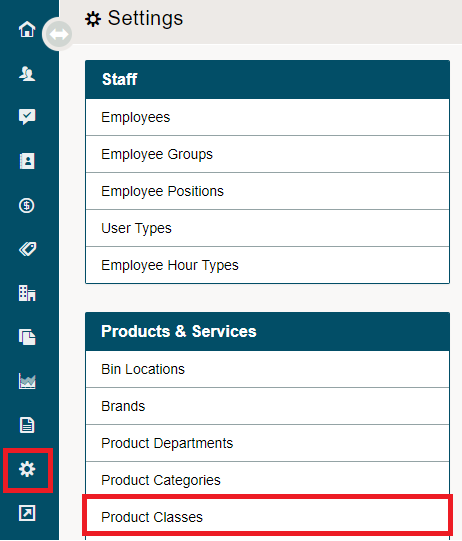
Go to the System Settings module then click on the Product Classes.
Click on the [+ New Class] button to add a new product class.

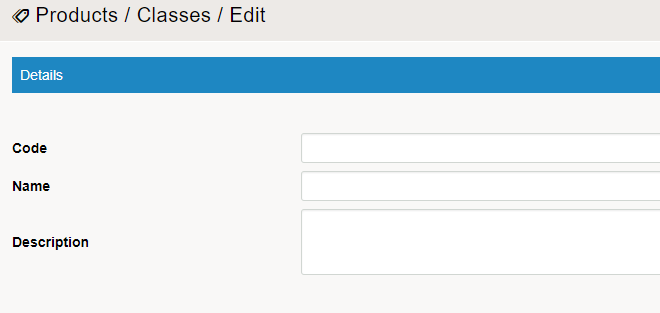
Fill out the fields provided under the product classes.
To view all of the product classes, click on the product classes under settings.

Comments
0 comments
Please sign in to leave a comment.