
Start by selecting the Staff Member and the Invoice Status (All, Paid). If commissions are not paid out until a payment by the customer is received, be sure to change the Invoice Status to Paid.
The items, with the attached account, sales date, quantity, commissionable amount, rate and total will be displayed.
Scroll to the bottom right to see the total commissionable amount of products sold and the total commission the employee should receive.
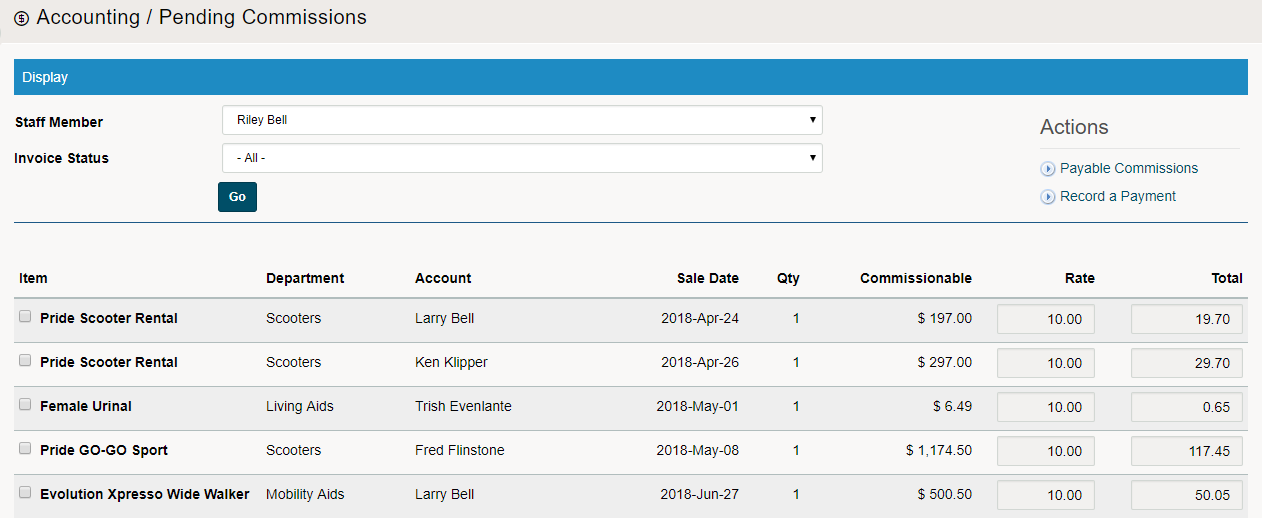
Be sure to [] check all that are approved by a manager. They can be approved (one by one) or at the bottom of the page use the (Check all / Uncheck all).
From there, select the With Selected [Approve or Void] in the drop-down, then click on GO.
Change Commission Rate or Commission Total manually on the Pending Commissions Page: First, check off the item and row you wish to change. The Rate and Item will now be unlocked and you will have the ability to manually change the rate and total before approving.

After you have Approved Commissions, you will now need to see the Commissions Payable.
Comments
0 comments
Please sign in to leave a comment.