
It's not always enjoyable, but the inevitable happens, a customer complains about a product. Over time these product complaints can add up, and it's best that management addresses them head-on with the department or the manufacturer.
Example
Tony's Seed Company orders seeds for flowers from across the country to sell at their retail location. Their shelves are stocked with seeds packets for customers to plat Tulips, Lillys, Daisies, Roses and more.
Throughout the year, Tony notices that he has been logging quite a few complaints about the White Rose seeds that he was supplied with from Catherines Flower Emporium.
Noticing this part way through the year, Tony calls Catherine and states his case that the White Rose seeds that they purchased in bulk have had quite a few complaints about the summer.
He is able to send a list of the time-stamped complaints to Catherine, and in turn, Catherine sends Tony new White Rose seeds, that Tony forwards to his customers to plant for next year.
Steps
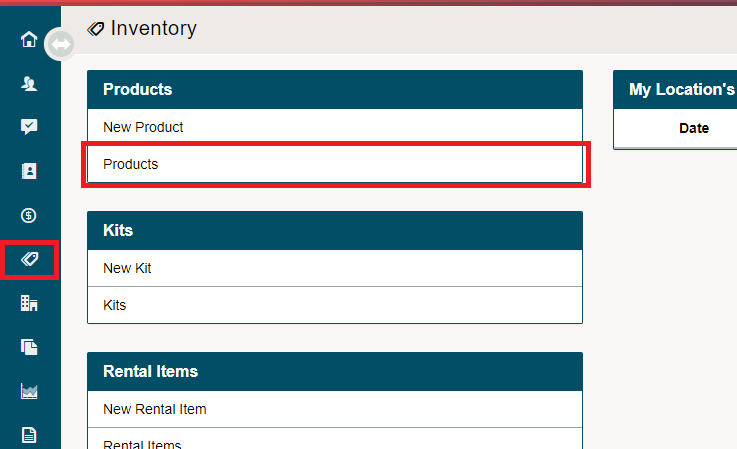
Go to the Inventory Module on the Left-hand menu followed by Products.
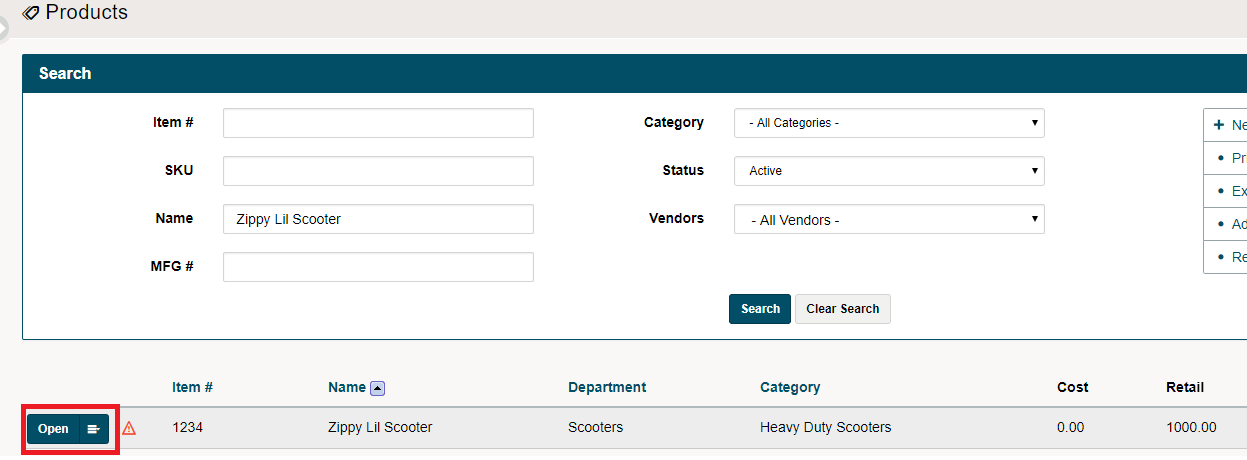
Click on the blue open button beside the product.
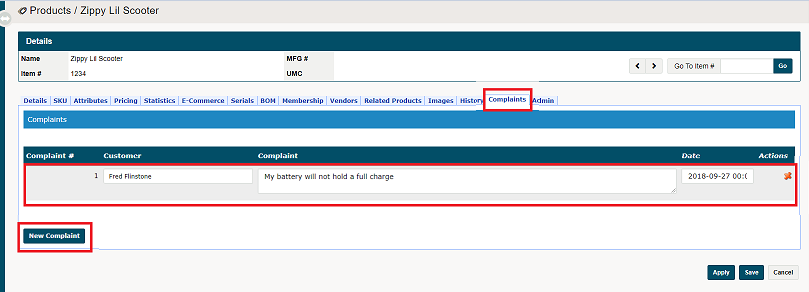
Inside of the product, navigate to the Complaints Tab. Here you can attach the customer and the notes of the complaint about the product.
Comments
0 comments
Please sign in to leave a comment.