
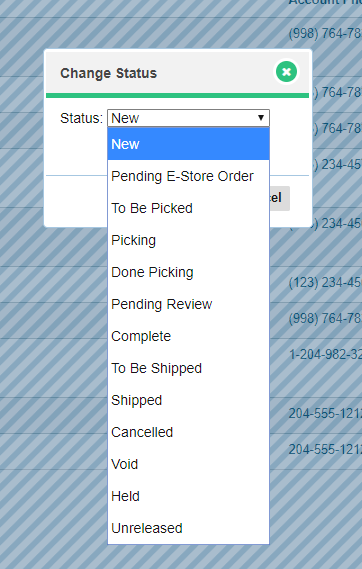
Sales Orders can be quite complex in their Status. In your GO Business / MEHD system there are several statuses to choose from. They appear on the right-hand column of your Sales Order List to quickly analyze the status off all Sales Orders.
Sales Order Statuses
- New - new Sales Order that has not been touched
- Pending E-Store Order - Sales Order from your E-commerce Store
- To Be Picked - Order verified, that is to be picked in the warehouse
- Picking - Order verified employee is picking in the warehouse
- Done Picking - Order has been picked from warehouse by an employee
- Pending Review - To be reviewed by Manager/Shipper
- Complete - Review passed and packaged
- To Be Shipped - In shipping dock, packaged
- Shipped - Shipped to Customer
- Canceled - Sales Order Canceled
- Void - Sales Order Voided
- Held - Sales Ordered Held until further notice
- Unreleased - Sales Order not released at the time, waiting for more shipments
To Change Multiple Sales Order Statuses
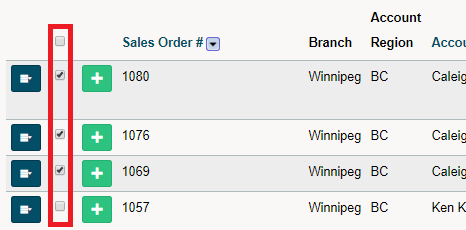
On the Sales Order Screen, click on the checkboxes beside the Sales Order.
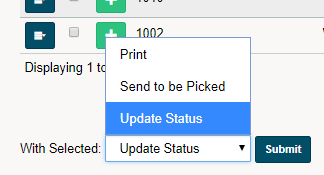
At the bottom of the page, change the With Select dropdown field to Update Status and click on Submit.
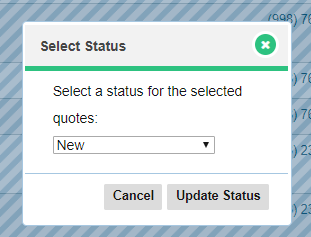
Select the status that you wish to change all the selected Sales Orders to, and finish by clicking the Update Status button.
Comments
0 comments
Please sign in to leave a comment.