
At times your employees or manager may need to void and invoice.
Reasons you would Void an Invoice
There are several occasions when you would like to void an invoice, probably due to the following reasons-
- Let’s say your customer had placed an order and you had raised an invoice for it. Later for some reason, he/she decides to cancel the order and haven’t yet paid for it. Now you have to remove the invoice, instead of deleting the invoice you can mark it as void and keep it for your future reference.
- Voiding will be of immense help during audits as in this case records are not removed and can be readily referred to.
- Voiding can also come in handy in cases where you have to make a lot of changes in the invoice. Instead of making changes on the invoice, you can mark it as void and proceed to create a new invoice. Here you can very well maintain a reference between your old and new invoices.
- When you want to keep track of all invoices that you have issued, maintain a sequence and don’t want the sequence to be disturbed by deleting an invoice in-between.
- Voiding and maintaining the void invoices will help you track down customers who make too many cancels.
- Write-Offs on bad Accounts Receivable.
Steps
Go to the Accounting Module, followed by the Receivables list.
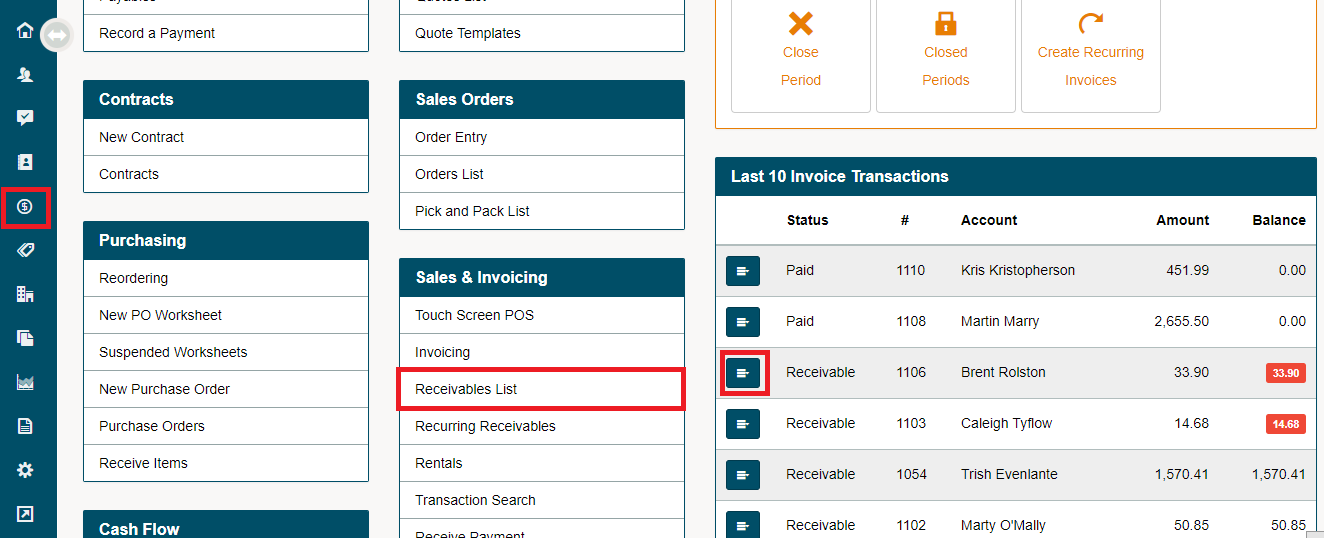
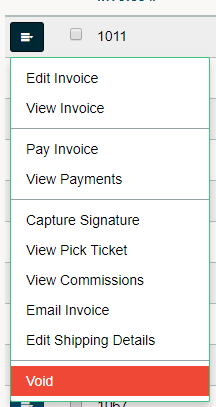
Click on the edit button beside the selected invoice. In the drop-down menu click the (Void) button.
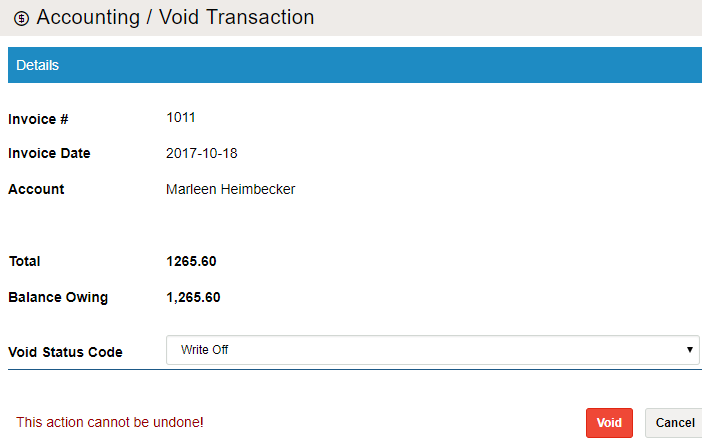
A new window will appear with the listed Invoice #, Account, and Totals with the Balance Owing. In the drop-down menu, select the void status code that has been set up in the system settings.
Comments
0 comments
Please sign in to leave a comment.