
Use the list below to find out how each field in the Details Tab of a New Lead.
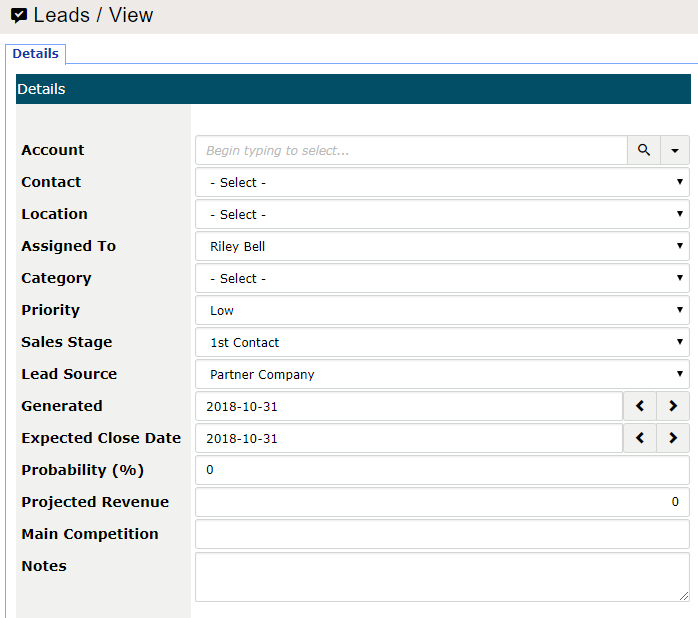
Account: Name of the account/customer that the lead is tethered to. This will attach the lead to the account/customers history. This field is used as a type ahead field. If the account/customer cannot be found use the magnifying glass beside the field. To create a new account/customer use the drop-down button (V) to create a new customer on the fly.
Contact: If the account/customer has any tethered contacts they will be available in this drop-down list. An example would be if an account you deal with has multiple purchasing powers and you predominantly deal with one contact, this is where they would be selected.
Location: If you have multiple retail or corporate locations, which company location is the lead tied to.
Assigned To: If there are multiple sales people in your organization, it will default to the user creating the new lead. If at anytime the lead needs to be assigned to an alternate employee, select the employee in the Assigned To field. This is important as select employees may only have access to view their own leads, whereas managers may have access to view the entire sales teams leads.
Category: The incoming source of the lead (Email, Advertisement, Referal, etc.)
Priority: Priority level (Low, Medium, High, etc.)
Sales Stage: Where in the sales pipeline the lead currently is.
Lead Source: The source of the lead category (Email > Campaign 1, Campaign 2, etc)
Generated: Day the lead was created. Can be backdated.
Expected Close Date: The date the lead will move to be accepted by the client and become a Sales Order or an Invoice.
Probability (%): Probability of closing the deal on a percentage basis.
Projected Revenue: The total revenue to be made off of the lead. If a quote is created, this can be copied as the total amount of the quote.
Main Competition: Any other sources of competition
Notes: Any additional notes. Notes can be seen by anyone who has access to view the lead.
Comments
0 comments
Please sign in to leave a comment.