
Lead Sources allow you to track lead for reporting purposes. Looking further into the sources and budgets that have been set for marketing activities will help create an analytical analysis of Lead Sources.
Lead Category VS Lead Source
|
Lead Category |
Lead Source |
|
Referral |
Customer, Partner Company, Employee |
|
Social |
Twitter, LinkedIn, Facebook |
|
Search Engine |
Google. Bing, Yahoo |
|
Event |
Seminar, Webinar (e.g. Seminar 6/6/16) |
|
Advertisement |
Print, Web, Remarketing (Print Ad – My Business Magazine June) |
|
EDM |
Email Campaign #1, Email Campaign #2, |
|
Website |
Called In, Contact Us Form, Estore |
Steps
Go to the System Setting module located on the left-hand menu followed by clicking on the Lead Categories button under the Leads heading.
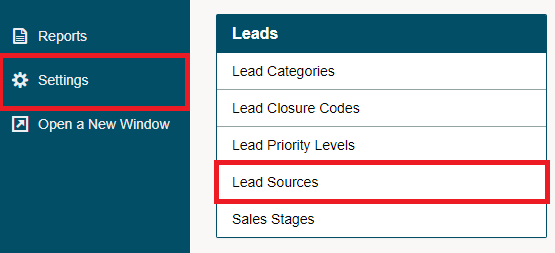
On the Lead Sources page, select [+ New Source] button in the top right-hand of the page.

On the New Lead Source screen, provide the following information:
Name - The name of the new lead source. The name will appear in the lead source drop-down list when you are creating a new lead. Type in a suitable name.
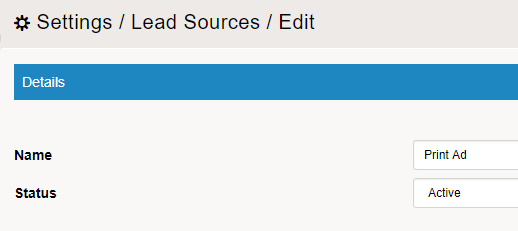
Finish by clicking on the [Save] button.
Comments
0 comments
Please sign in to leave a comment.