
Do you have a separate area of your warehouse that you hold orders or ship from with labeled aisles and shelves? Or do you use bins to place entire customers shipments in before it gets packaged and shipped?
In both such cases, the ability to retrieve the customer's order is key. With the ability to change a Sales Orders location you can do just so.
Steps
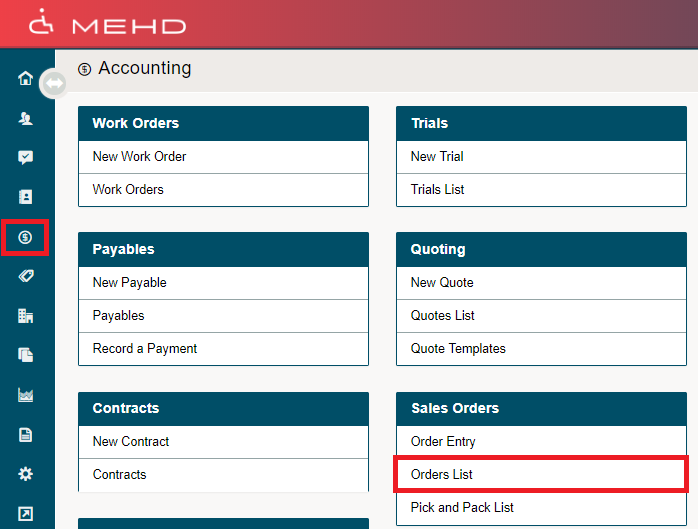
Click on the Accounting Module in the left-hand menu. From there, click on the Orders List.
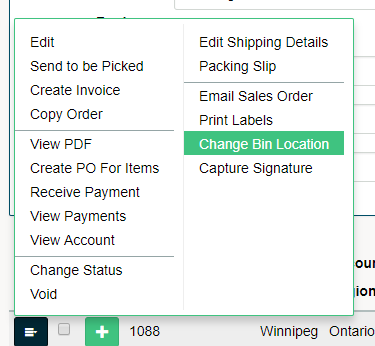
Inside of the Orders List, click on the blue menu button beside the Sales Order you wish to change the bin location for. In the drop-down menu, click on Change Bin Location.
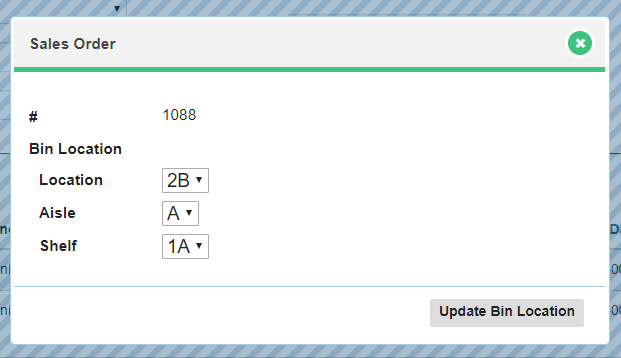
A new window will appear, update the options from the drop-down lists provided.
If you have not set up Bin Locations, click here to learn more.
Comments
0 comments
Please sign in to leave a comment.