
Pre-tax shipping is used for Quotes, Sales Orders, and Invoices that will automatically have shipping from a third party (Canada Post, UPS, etc.) to deliver the product.
Since these third
Steps
1 - Create A Product Named 'Shipping'
If you have not done so, please learn how to create a new product.
List the products departments and categories as the following:
- Department: Service OR Shipping
- Category: Service OR Shipping
Be sure to apply the correct tax rates for the departments related to shipping.
Be sure to additionally:
- List the Retail Price
- Change inventory Tracking to 'No' on the product statistics page
- Save the product
- Remember the product number
2 - System Settings
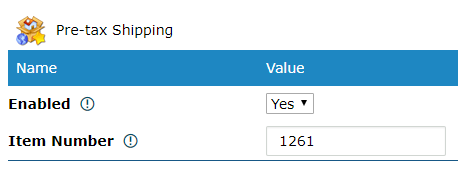
Under the Pre-tax Shipping in System General Settings:
- Enabled: Yes
- List the item number for shipping
3 - Using Pre-Tax Shipping
Create a new (Quote, Sales Order, Invoice). You will notice that the 1st product listed is 'Shipping' with the retail price listed. The Unit Price may be changed to a higher or lesser amount as the taxes will fluctuate with the price.

Since the shipping is pre-tax you will notice that the applicable taxes to shipping will be added.
Comments
0 comments
Please sign in to leave a comment.