
Using 'Templates' can drastically save time and reduce the amount of errors staff may have with quotes.
Steps
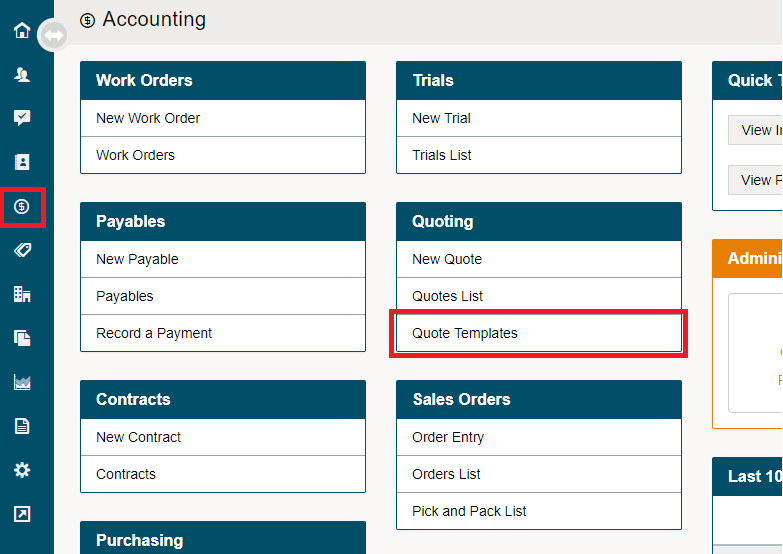
Go to the Accounting Module on the Left-Hand Menu.
Under the Quote heading, click on Quote Template.
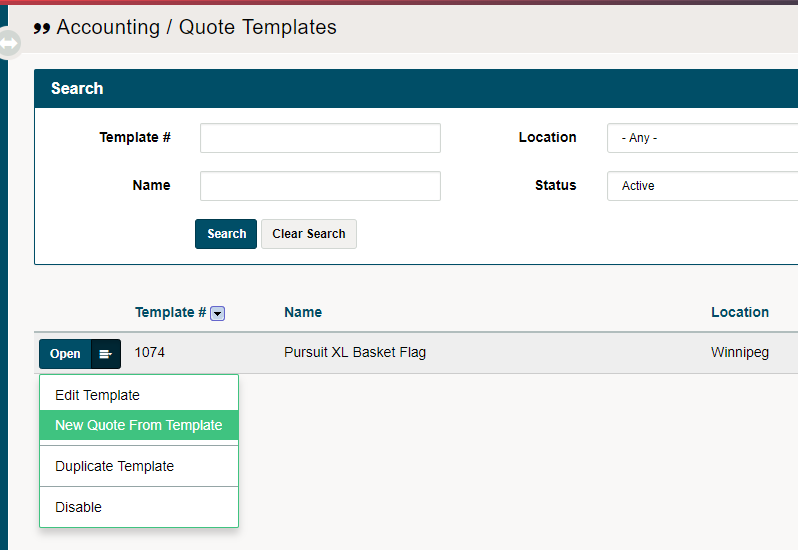
Viewing all of the Quote Templates, click on the blue edit button beside the Quote Template you wish to copy. Follow this by clicking on 'New Quote From Template'.
Add a customer to the quote along with any additional items, and notes. Finalize the Quote by clicking on save. You have now use the quote template.

To view all of the quotes information use the 'Quote List'. To learn more about the Quote List click here.
Comments
0 comments
Please sign in to leave a comment.