
The idea behind serial numbers is to identify a specific item, much like how a fingerprint identifies a specific person. Instead of some names or numbers that specify a whole range of products, a serial number is intended to provide a unique number to one device at a time.
With the serial number import, you are able to import multiple serial numbers for the items that you may wish to keep track of for the purposes of warranty, callbacks or future service.
Steps:
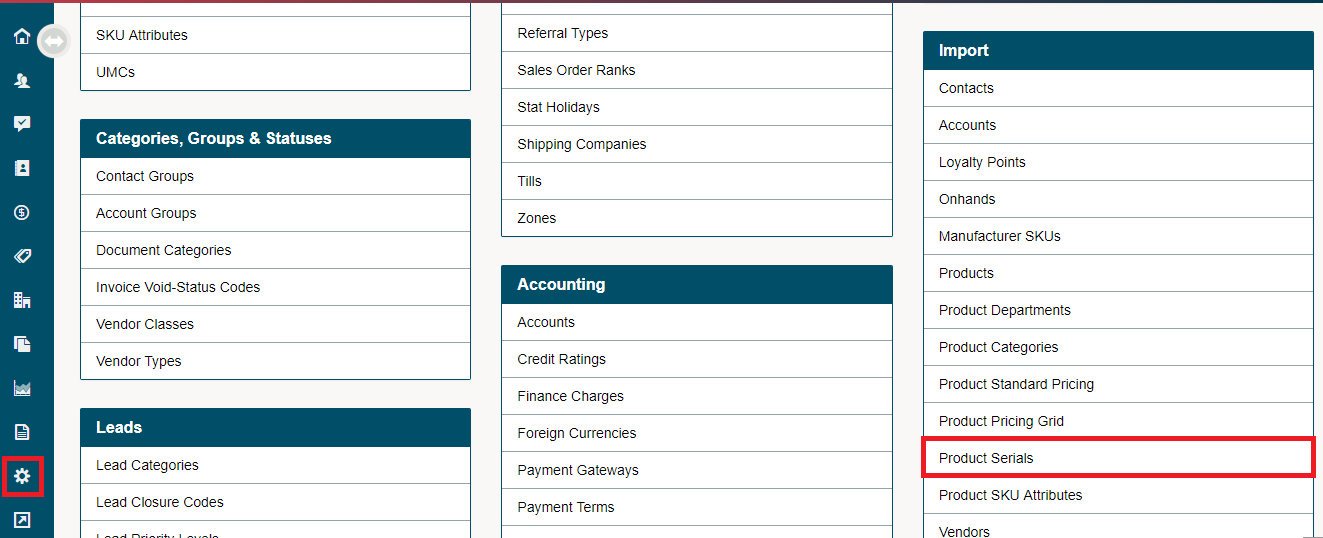
1. Select the Settings module located on the left-hand menu, then click on Product Serials under the Import heading on the right-hand side.
3. Click on Download Template. Open the template on your desktop.


4. Copy and paste the existing serial numbers of the onhand product that you wish to track per location. If you don't have existing data simply fill out the columns with the correct Item #, Location Code, and Serial #.
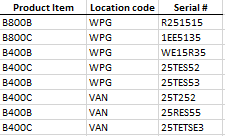
Be sure that the Location Code matches that in your system settings.

5. Save the finished file as a CSV file.

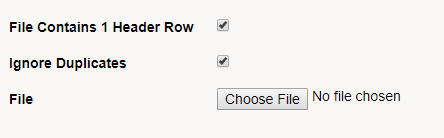
6. Navigate back to the Product Serials Import, be sure to check off the File Contains 1 Header Row and Ignore Duplicates if needed. Choose the file to select your saved Product Serials CSV file.
7. Click on the Import button. Your system will import the selected file. After the import is complete, type in your URL and log back into your system.

Comments
0 comments
Please sign in to leave a comment.