
Use the Purchase Order Search window to narrow down and find an exact Purchase Order or Batch Order. Use the Purchase Order Search to also find a list of 'New' Purchase Orders that are going to the same Vendor.
Steps
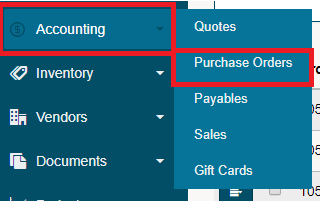
Hover over the Accounting Module, then click on Purchase Orders
In the top right-hand corner of the new window, click on [Purchase Order Search].

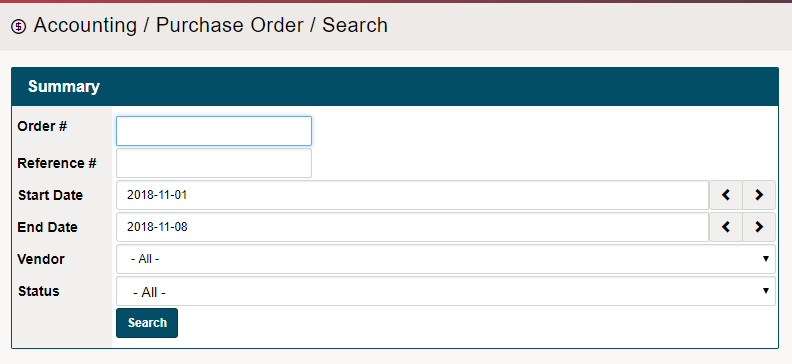
A new window will appear. Use the fields provided to narrow your search for the Purchase Order or Batch Order. Be sure to click on the [Search] button.
- Order #: The Purchase Order number OR Batch Order Number
- Reference #: Created reference number
- Start Date: The earliest date the Purchase Order would have been created
- End Date: The lastest date the Purchase Order would have been created
- Vendor: Name of the Vendor
- Status: Status of the Purchase Order
- [New, Printed, Sent, Complete, Count In Progress, Partially Recieve, Received, Void]
Click Here to Learn how to Recieve Purchase Orders
Click Here to Learn how to Recieve Batch Purchase Orders
Comments
0 comments
Please sign in to leave a comment.