
Do you have companies or customers that make large purchases from your organization? Use Credit Ratings to keep track of the customer's past credit performance with your company.
By verifying the customer's credit rating in turn you could allow them to have a larger credit amount. This would allow the customer to in turn purchase larger lump sums of product from your company without having defaulted on the payment terms.
Example
- Excellent
- Good
- Fair
- Poor
Steps
Go to the System Settings module, followed by clicking on the Credit Rating button under the Accounting heading.

In the Credit Rating window fill out the (Code, Name, and Colour) of the credit rating you would like to create.

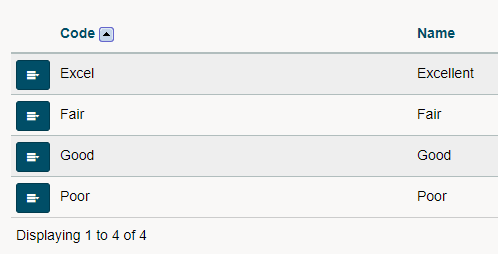
You will now be able to see the created credit ratings in a list.
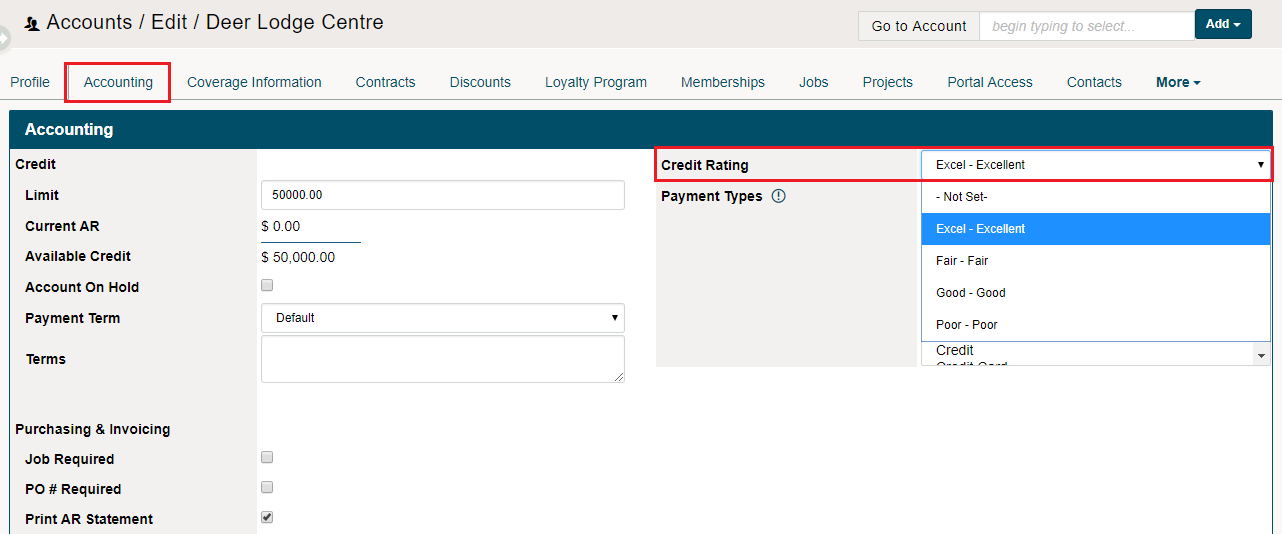
Inside of a customer's profiles, you will be able to access Credit Ratings. Open a customer profile and click on the Accounting Tab. On the right side of the accounting tab, click the drop-down next to the Credit Rating field. You will now be able to select the credit ratings you have created.
Comments
0 comments
Please sign in to leave a comment.