
Finance charges can be applied to customers invoices if they do not pay the invoice by the end of the grace period (due date).
Stating that past due bills will be charged a late fee, including a percentage amount.
Example
- Annual Interest Rate: 18%
- Minimum Charge Per Transaction: $0.00
- Grace Period: 30 Days
- Charges From
Note: If you set up a grace period, set up your default payment terms to the same grace period. Net 30 = Grace Period of 30 Days, Net 10 = Grace Period of 10 Days
Steps
Go to the System Settings module, followed by clicking on the Finance Charges button under the Accounting heading.

In the new window you will see the following, fill out with your company finance charges:
- Select the Annual Interest Rate.
- Set the Minimum Charge Per Transaction
- Set how long of a Grace Period you'd like to give
- Choose weather finance charges should be calculated from the Invoice Date or the Due Date.
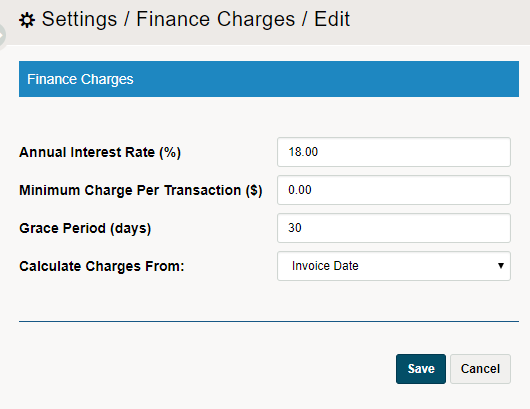
Choose Save. All invoices will now have applicable finance charges to invoices if they are not paid by the time the grace period is over.
Comments
0 comments
Please sign in to leave a comment.