
Learn how to navigate GO Business/MEHD with the top menu functions.
Overview

Top Toolbar
The top toolbar allows users to quickly access functions and modules throughout the MEHD / GO Business system.
1 - Quick Create Button
Create new customers, vendors, invoices from anywhere in your system with one click.
2 - Notifications
Get notified when products are low or you have an upcoming appointment right on your dashboard.
3 - Inbox
The inbox allows users to see their internal messages that have been sent by other employees directly to them or to the employee groups that they belong to.
4 - Messages
Reach out to other employees directly through messages, or message entire groups throughout your company.
5 - User Profile
The user profile allows the user that is logged in to edit the basic fields inside of their profile, talk to staff online, link to the knowledge base to search for information and log out.
User Profile Drop Down
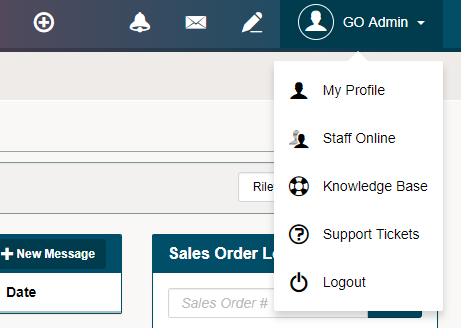
1 - My Profile
Customize your system experience by tailoring your settings through your profile. From profile information, Availability, Positions, Preferences and more.
To learn more about Staff Settings - Click Here.
2 - Staff Online
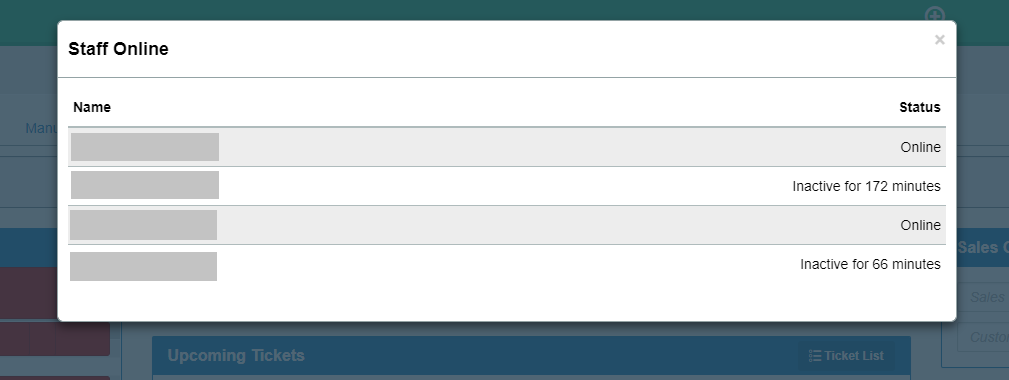
View who is currently active in your system and who is inactive.
3 - Knowledge Base
By clicking on 'Knowledge Base' you will be brought directly to the internal library of articles and videos that will answer the questions you may have about your GO Business or MEHD system.
Once inside, use the search bar to directly search for your answer or use the buttons to navigate for more information.
Comments
0 comments
Please sign in to leave a comment.