
Learn how to navigate GO Business/MEHD with the Left Module menu functions.
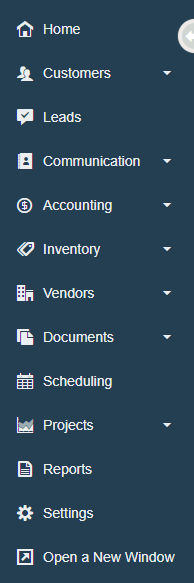
Home
Use the home dashboard to leverage your everyday tasks, from scheduling, to calls, to do's, correspondence and more.
Customers
Keep track of individual customers, business based customers, and all their contacts in one place.
Leads
Stay up to date with lead pipeline management. Use the leads module to track values, quotes, and potential customers as they work their way to becoming a full-fledged customer.
Communication
Need to message a co-worker? Create a mailing list? or a Letter template? You're in the right spot with the communications module.
Accounting
From Quotes, Work Orders, Purchase Orders, Sales Orders, Invoices, Rentals, POS and more, the Accounting Module has all of your sales needs.
Inventory
Keep track of all of your products, from descriptions, on hands, on order, transfers, rental items, cycle counts, and kits.
Vendors
If you need to need to look up information about a vendor, log conversations, or change contact information for a vendor you're in the right place.
Documents
Store all of your documents on the cloud with your documents module. From security settings so that only certain levels of employees can see documents to the wide range of documents that are acceptable, the documents module has you covered.
Projects
Have several tasks that need to be completed by different team members? Projects is a great way to track, well, where your projects are with tickets, hours, project communication and more.
Reports
The Reports module is a great place for your management and executives to analyze the health of your business. Use reports for sales, products, accounting, rentals and more to make analytical decisions.
Settings
This is where the brains of your system are. Be sure to set up your system settings correctly to set your team up for success. Everything from Employee Settings, to Sales, Service, Product Settings and more.
Open a New Window
Need to work off of two screens at once? No problem, just click the 'Open a New Window' icon and you will be able to work in your system at the same time on two screens.
Comments
0 comments
Please sign in to leave a comment.