
Cashing out requires accuracy. With the End of Day report, you can track each station’s sales, payments, credits, and expected compared to actual totals. You can run the report at any point during the day, and review daily station histories with a mouse click.
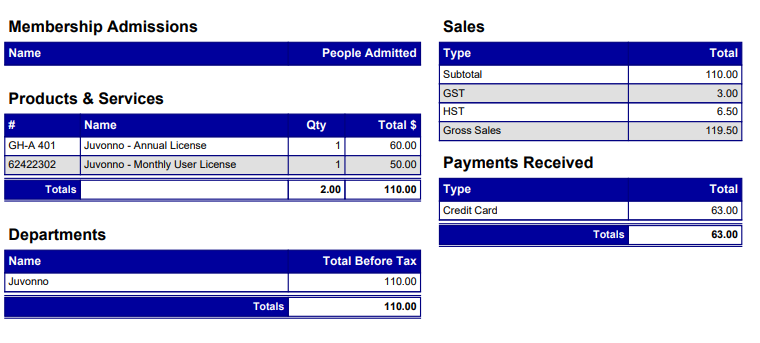
(General Summary)
Steps:
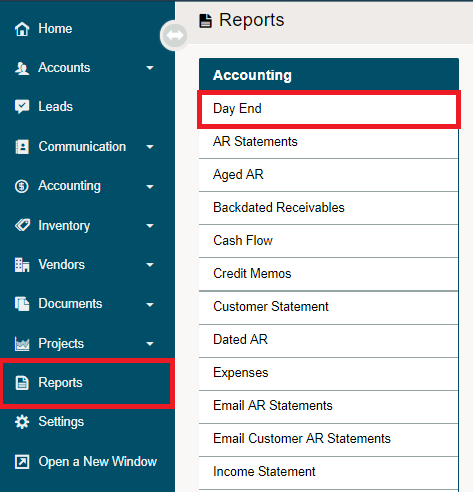
Go to the reports modules, then click on Day End under the Accounting heading.
Select the options you would like to include from the report parameters, the date, and the location(s) then click on the Create button.
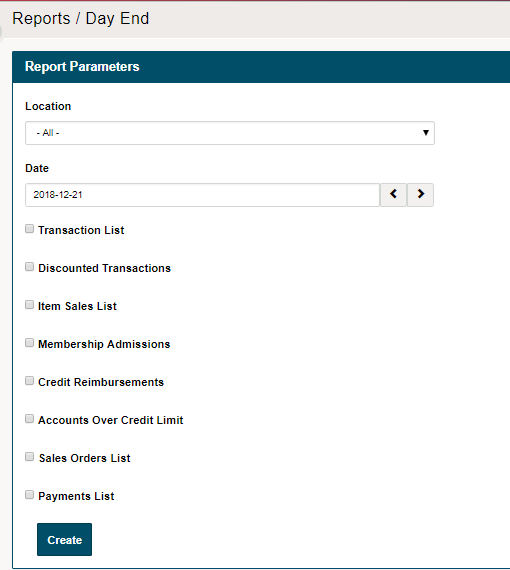
- Location: Able to select all locations or break down per store(s) locations
- Date: Which date would you like to run the report for
- Transaction List: Full list of every transaction run for the day.

- Discounted Transactions:

- Item Sales List:

- Membership Admissions: Name, people admitted

- Credit Reimbursements:

- Accounts Over Credit Limit: Customer, Credit Limit, AR Balance, Over Limit

- Sales Orders List:

- Payments List:

Comments
0 comments
Please sign in to leave a comment.